
Maximizing Machine Learning Accuracy with Video Annotation & Labeling
A Comprehensive Guide

Key Takeaways
- Video annotation teaches ML models what objects are and how they move and change over time (tracking, actions, events).
- The biggest difference from image annotation is temporal consistency: the same object should keep the same identity (ID) and label across frames.
- Modern teams reduce effort with keyframes + interpolation/propagation + AI-assisted pre-labeling, then invest savings into QA.
- Dataset design (sampling rate, clip strategy, ontology) often matters as much as the tool you pick.
What is Video Annotation?
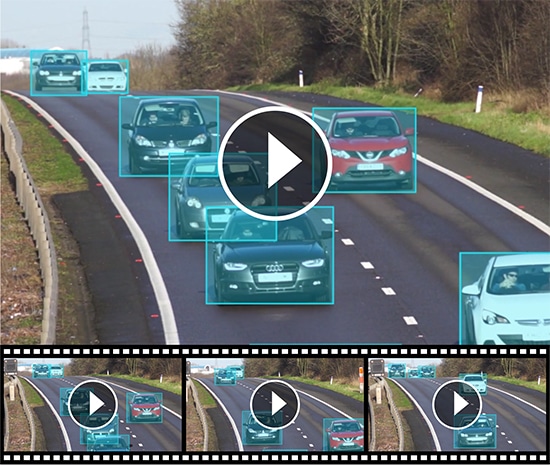
Video annotation is the process of labeling objects, actions, or events within video frames so computer vision models can learn from structured “ground truth.”
Unlike static images, video annotation must preserve temporal context—what happens across frames (movement, occlusion, changing poses, interactions).
For example, in the development of autonomous vehicles, video annotation is used to label road elements like pedestrians, traffic lights, other vehicles, and lane markings in dashcam footage. This helps the AI system learn how to navigate safely in real-world environments by recognizing and responding to various objects and scenarios as they appear in motion.
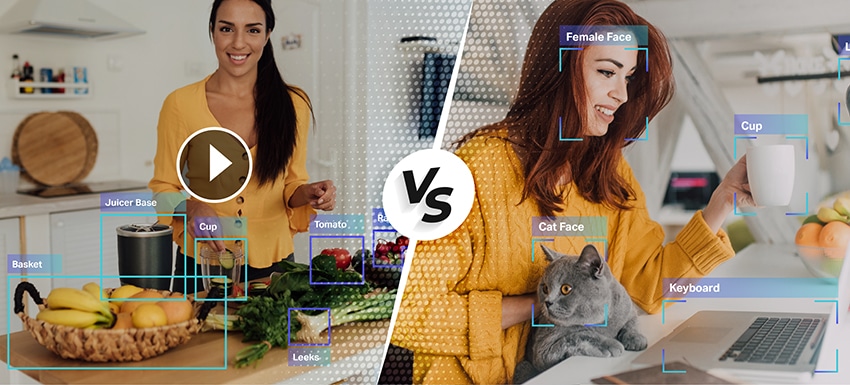
Video Annotation vs. Image Annotation
| Factor | Image Annotation | Video Annotation |
|---|---|---|
| Data structure | Independent samples | Time-ordered frames (sequence) |
| What models learn | Appearance in a moment | Appearance and behavior over time |
| Hard part | Tight geometry | Temporal consistency (identity, occlusion, drift) |
| Efficient strategy | Label each image | Keyframes + propagation/interpolation + QA |
| Typical outputs | Boxes/masks/keypoints | Tracks (identity over time), events, frame-level labels |
Purpose of Video Annotation & Labeling in ML
Your original “purpose” section is good and should remain. Here it is expanded with context so it’s more useful to both engineers and buyers:
1. Detect objects (What is present?)
Goal: train models to answer “what objects exist in this frame?”
Typical output: bounding boxes, polygons, segmentation masks.
When this matters:
- Counting people/vehicles/items
- Inventory / shelf analytics
- Basic compliance monitoring (helmet/no helmet)
2. Localize objects (Where are they?)
Localization focuses on precise position. This can be:
- Coarse (2D bounding boxes)
- Fine (polygons/segmentation)
- Depth-aware (3D cuboids)
Why it matters:
- Navigation and robotics need reliable geometry
- Medical imaging/video needs boundary accuracy
- Manufacturing needs precise defect location
3. Track objects (Where do they move over time?)
Tracking teaches models identity over time—the same object should keep the same track as it moves, disappears behind obstacles, or reappears.
This is crucial in tracking benchmarks and formats where annotations explicitly encode object identity over frames (e.g., MOT sequence format specifies identities over time).
4. Track activities/events (What happened?)
Activity tracking is about labeling actions and events such as:
- “Person falls” (start/end)
- “Forklift enters restricted zone”
- “Customer picks item → returns item”
- “Vehicle changes lane”
This can be represented with:
- Frame-level tags (“action present in frame”)
- Temporal segments (start time → end time)
- Object-linked events (“this person is running”)
Video Annotation Techniques
1. Keyframe Annotation
Annotators label only the most important frames—where objects change position, size, or visibility. The rest of the video is filled in using propagation, then quickly reviewed and corrected.
2. Interpolation / Propagation
After labeling two keyframes, the tool automatically carries the annotation through the frames in between. This saves time on repetitive work, but still needs review when motion is fast or objects get occluded.
3. Auto-Tracking (Track IDs Across Frames)
The tool follows an object across frames to maintain a consistent identity (track) over time. It works well for persistent objects, but can fail in crowded scenes—so ID-switch checks are important.
4. AI-Assisted Pre-Labeling + Human QA
Models suggest boxes/masks/tracks first, and humans approve or fix them. This speeds up labeling in consistent environments, but only delivers quality when paired with strong QA and clear guidelines.
Video Annotation Types and When to Use Each
Keep this section exiting content and this table after it
| Annotation type | Best for | Pros | Watch-outs |
|---|---|---|---|
| 2D Bounding Box | Detection + tracking in many domains | Fast, scalable | Loose boxes reduce quality; needs ID continuity |
| Polygon | Irregular shapes (people/animals/objects) | More precise boundaries | Slower than boxes |
| Semantic / Instance Segmentation | Pixel-accurate understanding | Best for boundaries, dense scenes | Expensive; needs strong QA |
| Keypoints / Landmark | Pose, faces, gestures | Enables pose/action understanding | Requires clear guidelines per keypoint |
| Polyline | Lanes, borders, paths | Great for road/lane detection | Guidelines needed for merges/splits |
| 3D Cuboid | Depth-aware scenes (automotive/robotics) | Captures 3D position/volume | More skill + time required |
| Temporal event tags | Actions/events with start/end | Powerful for activity recognition | Needs tight definitions for “start/end” |
Video Annotation Industry Use Cases
Video annotation is used across many industries, but adoption is highest where models must understand movement, behavior, and events over time. Below are the most common industry use cases.
Autonomous Driving & ADAS
Common goals: Detect and track road users, understand lane structure, and recognize safety-critical situations (near misses, sudden braking, cut-ins).
What to label: Vehicles, pedestrians, cyclists (with consistent IDs across frames), traffic lights/signs, lanes/road edges, and events like “lane change” or “pedestrian crossing.”
Best annotation types: 2D bounding boxes + tracking IDs (core), polylines for lanes/road edges, optional 3D cuboids for depth/size understanding.
QA focus: Prevent ID switches in crowded scenes, define clear occlusion rules (when objects are partially hidden), and keep lane lines consistent across frame changes.
Healthcare (Medical Video: Endoscopy/Ultrasound/Surgery)
Common goals: Identify clinically relevant regions and landmarks over time to support detection, classification, and procedure understanding.
What to label: Regions of interest (lesions/tissue boundaries), anatomical landmarks, instrument locations, and temporal segments (e.g., “polyp visible” start→end).
Best annotation types: Segmentation (for precise boundaries), keypoints/landmarks (for anatomy), boxes (for instruments), temporal event labels (for procedure steps).
QA focus: Boundary precision and label consistency are critical—use strict definitions, expert review, and clear “uncertain/ambiguous” handling to avoid noisy ground truth.
Retail & In-store Analytics
Common goals: Track customer movement, measure dwell/queue behavior, and detect product interactions to improve operations and layout decisions.
What to label: People tracks (IDs), store zones (shelf area, checkout zone), and events like “picked item,” “returned item,” “entered queue,” “left queue.”
Best annotation types: Boxes + tracking IDs for people, polygons for zones, temporal event labels for interactions and queue events.
QA focus: Clear event definitions (what counts as “pick” vs “touch”), consistent zone boundaries, and privacy-safe labeling rules (e.g., avoid face-level details if not required).
Geospatial (Aerial/Drone/Satellite Video)
Common goals: Detect and monitor infrastructure, map boundaries, and track moving objects (vehicles/ships) across large areas and varying resolution.
What to label: Roads/paths, buildings/areas of interest, water boundaries, moving objects (with tracks), and change events (construction progress, flooding spread).
Best annotation types: Polylines (roads/edges), polygons (areas/buildings), boxes + tracking (moving objects), optional segmentation for land/water/vegetation classes.
QA focus: Consistency across locations and zoom levels, rules for low-resolution objects, and strong guidelines for “partially visible” or blurred targets.
Agriculture (Farms, Crops, Livestock)
Common goals: Monitor crop conditions, detect weeds/disease, and track livestock behavior for productivity and safety.
What to label: Crop rows/field boundaries, weed vs crop regions, disease spots, animals (tracks), and events like “animal enters restricted area.”
Best annotation types: Polylines/polygons (rows/fields), segmentation (crop vs weed/disease), boxes + tracking (livestock), event labels (behavior incidents).
QA focus: Handling seasonality and lighting changes, consistent taxonomy (crop types/weed types), and clear rules for overlapping vegetation and partial visibility.
Media, Sports & Entertainment
Common goals: Track players/objects, detect highlights, and understand actions for analytics, broadcast overlays, or content indexing.
What to label: Players and ball/object tracks, key moments (goal, shot, foul), and optionally pose landmarks for detailed motion understanding.
Best annotation types: Boxes + tracking (players/ball), temporal event labels (highlights), optional keypoints for pose-based analysis.
QA focus: Precise event timing (start/end), ID continuity during fast motion/occlusions, and consistent definitions for subjective events (e.g., “foul” criteria).
Manufacturing & Industrial Safety
Common goals: Detect safety compliance issues, monitor restricted zones, and track equipment/people movement to reduce incidents.
What to label: People tracks, PPE attributes (helmet/vest), forklifts/robots, restricted zones, and events like “zone entry,” “near-miss,” “unsafe distance.”
Best annotation types: Boxes + tracking (people/equipment), attributes (PPE), polygons (zones), temporal event labels (safety incidents).
QA focus: Very clear compliance definitions (what counts as “helmet worn”), strict zone boundaries, and bias checks to reduce false alarms that hurt trust.
Step-by-step Workflow: How to Annotate Video for ML
Step 1: Define the task (and what “good” looks like)
Write down:
- Target use case (e.g., multi-object tracking vs action recognition)
- Required outputs (boxes vs masks vs tracks vs events)
- Acceptance metrics (example: consistency, completeness, review pass rate)
Competitor guides that rank well start here because it prevents rework later.
Step 2: Build your ontology + guidelines (the hidden ranking factor)
A strong ontology reduces “label drift” over time. Practical rules:
- Define each class with include/exclude examples
- Define occlusion policy (when to keep labeling vs stop)
- Define ID rules (when a new ID starts)
Teams that “iterate based on reality” run a small pilot, compare annotators, then refine guidelines.
Step 3: Prepare the video data (clips, sampling, keyframes)
Instead of labeling every frame:
- Segment long videos into meaningful clips (by scene, camera angle, scenario)
- Choose a frame sampling rate (lower rate reduces redundancy; higher rate increases coverage + cost).
- Use keyframes for moments of change (motion/occlusion/interaction), then propagate in-between.
Step 4: Annotate with temporal consistency in mind
Modern workflows typically look like:
- Label keyframes carefully
- Use interpolation/propagation or AI-assisted labeling to fill gaps
- Manually correct drift, occlusions, and missed objects
Automation is valuable—but only if you keep QA strict. Many “how-to” guides now treat automation as standard practice.
Step 5: QA that actually catches failures (not just “spot check”)
A practical QA stack:
- Calibration round: multiple annotators label the same clip → compare disagreements → update rules
- Continuity checks: IDs shouldn’t “jump” between objects; track integrity is critical for tracking datasets
- Edge-case review queue: motion blur, occlusion, crowded scenes
- “Flag uncertainty” policy: don’t guess; mark ambiguity for reviewers (prevents silent dataset corruption)
Step 6: Export annotations in formats your ML stack expects
If you’re training tracking models, your export must preserve frame association + identity (track_id). Formats like MOT are explicitly designed around frame_id and track_id.
Tip: Decide export format early so you don’t discover too late that you need tracks, attributes, or events that your current schema can’t represent.
Dataset Design Choices That Decide Cost + Model Performance
Frame rate / sampling strategy
- High sampling = more labeled frames, higher cost, more redundancy
- Lower sampling = faster labeling, but risk missing rare transitions. Roboflow-style guides explicitly recommend experimenting to balance richness vs workload.
Keyframes vs dense labeling
- Dense labeling can be necessary for fast motion or safety-critical tasks
- Keyframes + propagation often works for smoother sequences—then spend savings on QA
Clip strategy (diversity beats volume)
Often, you get better generalization from:
- more environments, lighting, camera angles, and edge cases than from simply adding more hours of similar footage.
Common Challenges of Video Annotation
Video annotation remains one of the most demanding parts of building reliable computer vision systems. While modern tools have improved speed, the challenge is no longer just labeling more frames. Teams now need annotated video data that is accurate, consistent, traceable, and representative of real-world conditions. Industry guidance increasingly points to a combination of automation, human review, and governance as the most effective path forward.
1. High-volume, time-intensive workflows
Video generates enormous amounts of data. A single project can contain thousands of clips, multiple objects per frame, and long temporal sequences that must be tracked consistently. Even with auto-tracking and interpolation, teams still need human review to validate difficult scenes, correct drift, and confirm edge cases.
2. Maintaining annotation accuracy across frames
Accuracy in video is harder than accuracy in images because labels must remain correct over time, not just in one frame. Bounding boxes, polygons, keypoints, and event tags can easily become inconsistent when objects move quickly, change shape, or disappear and reappear. This is why high-performing teams use clear guidelines, periodic audits, and consensus checks instead of relying on a single-pass labeling workflow.
3. Occlusion, motion blur, and scene complexity
Real-world footage is messy. Objects are often partially hidden, poorly lit, crowded, or moving at speed. These conditions make labeling harder and can reduce model quality if they are not handled consistently in the dataset. Recent research and tooling trends show growing attention to occlusion-aware annotation and edge-case handling because these are often the scenarios where production models fail.
4. Scalability without sacrificing quality
It is relatively easy to scale a labeling project by adding more annotators. It is much harder to scale while preserving consistency. As projects grow, teams often face label drift, reviewer mismatch, and uneven quality across batches. The strongest workflows combine automation for speed with human-in-the-loop validation, gold-standard review sets, and measurable agreement between annotators.
5. Dataset bias and incomplete edge-case coverage
A model trained on clean, repetitive footage may perform well in testing but fail in production. Video datasets must include enough variation in lighting, weather, camera angles, geographies, demographics, and rare events to reflect real deployment conditions. NIST’s AI risk guidance also reinforces the need to map context, measure risk, and manage downstream impact, which makes dataset design just as important as label execution.
6. Data security, privacy, and compliance
Video often contains sensitive content: faces, license plates, medical imagery, workplace footage, or customer environments. That means annotation is also a data governance problem. Depending on the project, organizations may need vendors and processes aligned with GDPR, HIPAA, or broader security management standards such as ISO/IEC 27001.
7. Weak documentation and poor auditability
A labeled dataset is only as useful as its instructions and decision history. If annotation rules are unclear, teams struggle to reproduce quality at scale. Modern annotation programs need versioned guidelines, exception handling rules, QA logs, and documented acceptance criteria so models can be improved iteratively rather than retrained on inconsistent ground truth.
How to Choose the Right Video Labeling Vendor
Choosing a video labeling vendor is no longer just a pricing decision. The right partner should help you improve dataset quality, shorten iteration cycles, and reduce model risk. In practice, the best vendor is the one that can combine domain expertise, secure operations, scalable delivery, and measurable quality controls for your exact use case.
Look for domain expertise, not just annotation capacity
A vendor may be excellent at generic bounding boxes but weak in healthcare imaging, autonomous driving, retail behavior analysis, or industrial inspection. Choose a partner that understands your ontology, your model objectives, and the edge cases that matter in your deployment environment. Domain familiarity usually leads to better guidelines, fewer rework cycles, and stronger label consistency.
Evaluate their quality assurance system
Ask how the vendor measures annotation quality. Strong vendors typically use multi-stage QA, reviewer escalation, gold-standard benchmarks, and annotator agreement checks where appropriate. If quality is described only in general terms and not tied to measurable workflows, that is a warning sign.
Confirm they support human-in-the-loop workflows
Modern video labeling should not be entirely manual, and it should not be entirely automated either. The best providers combine model-assisted pre-labeling, object tracking, interpolation, and expert human review. This hybrid approach usually improves speed while preserving accuracy on difficult frames and ambiguous events.
Verify security and compliance readiness
If your data includes personal, medical, financial, or regulated content, security cannot be an afterthought. Ask about access control, audit trails, data segregation, retention policies, and whether the vendor can support requirements relevant to your business, such as GDPR, HIPAA, or ISO/IEC 27001-aligned practices.
Assess scalability and turnaround realism
A vendor should be able to ramp from pilot to production without degrading quality. Ask how they handle sudden volume increases, multilingual or multi-geo programs, reviewer training, and edge-case escalation. A cheap quote is not useful if it creates downstream delays, relabeling, and model retraining costs.
Ask about tooling, integration, and auditability
Good vendors should work comfortably with modern annotation platforms and support clean exports, taxonomy versioning, and QA reporting. You should be able to trace what was labeled, by whom, under which guideline version, and how disputes were resolved. That visibility is essential for model debugging and ongoing MLOps improvement.
How Shaip Supports Video Annotation Projects
Shaip supports video annotation projects with data collection, frame and event labeling, object tracking, segmentation, temporal tagging, and quality review. Shaip also supports sensitive video workflows with de-identification, including masking or blurring identities when needed. Across use cases, Shaip can help with computer vision, healthcare AI, multimodal AI, and spatial AI projects, while also supporting related services such as licensed datasets, transcript alignment, and metadata enrichment.
Let’s Talk
Frequently Asked Questions (FAQ)
Define the task, build labeling guidelines, choose sampling/keyframes, annotate with temporal consistency, run QA, then export in the format your training pipeline expects.
Video datasets commonly use frame and event labels, tracking tags, segmentation masks, and temporal tags that mark when an action starts and ends.
Quality is usually improved through temporal QA, review of difficult motion cases, multi-pass quality control, and expert adjudication for edge cases.
Yes, sensitive visuals in video can be protected through de-identification methods such as blurring or masking identities and other private content.
They should look for support across video collection, frame and event labeling, tracking, segmentation, temporal tagging, QA, and related curation services like transcript alignment and metadata enrichment.
Cost is driven by frame volume, annotation type (boxes vs segmentation vs 3D), scene complexity, and QA requirements. A pilot helps estimate time per clip before scaling.
Common use cases include object tracking, action recognition, event detection, surveillance analysis, road and lane segmentation, and vehicle damage assessment.