
What is Image Annotation: Types, Workflows, QA & Vendor Checklist [Updated 2026]
This guide helps you choose the right annotation approach for your computer vision project, set measurable quality standards, and evaluate vendors with a practical checklist—so your labels are accurate, consistent, and audit-ready.
This guide handpicks concepts and presents them in the simplest ways possible so you have good clarity on what it is about. It helps you have a clear vision of how you could go about developing your product, the processes that go behind it, the technicalities involved, and more. So, this guide is extremely resourceful if you are:
Introduction

In 2026, many teams speed up labeling with model-assisted pre-labels (auto-boxes, auto-masks) and then use humans for verification, correction, and edge-case handling—often in an active learning loop to prioritize the most valuable samples. Promptable segmentation models (for example, SAM-style workflows) can accelerate mask creation, but strong QA is still required for long-tail classes and domain shift.
This buyer’s guide walks through annotation types, techniques, modern workflows, QA metrics, and a vendor checklist so you can scope projects accurately and avoid expensive relabeling.
What is Image Annotation?
Image annotation is the process of adding structured labels to images (and video frames) so machines can learn what’s in a scene and where it appears. These labels become ground truth used to train, validate, and benchmark computer vision systems.
Annotation quality depends on three things:
- A clear label taxonomy (classes + attributes + definitions)
- Consistent guidelines (edge cases, examples, what to ignore)
- Quality controls (review workflows, sampling, and acceptance criteria)
Common outcomes include: class labels (e.g., “defect / no defect”), object locations (boxes), pixel-accurate regions (masks), keypoints/landmarks, and tracking IDs across frames.
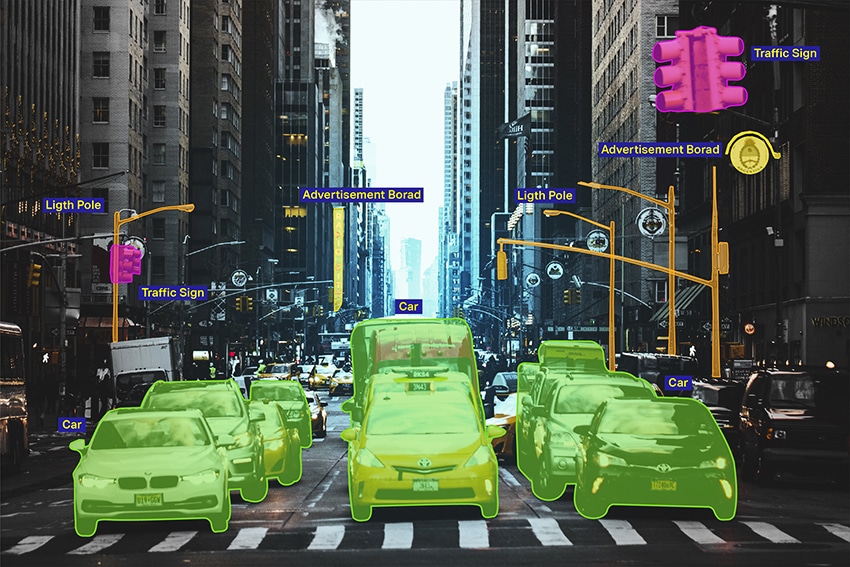

Image Annotation at a Glance
Modalities
- 2-D images
- Video/Multi-Frame
- 3D/LiDAR
Tasks
- Classification
- Detection
- Segmentation
- Tracking
Shapes
- Boxes/Cuboids
- Polygons/Masksn
- Polylines
- Keypoints/Landmarks
Deliverables
- Label Files + Schema
- QA Report
- Versioned Datasets
- Secure Transfer
Most computer vision teams annotate multiple image types, depending on the application:
- 2D Images: Product photos, medical images, industrial inspection, retail shelves
- Video/multi-frame: CCTV, dashcams, sports analytics, robotics, drones
- 3D/LiDAR/Sensor Fusion: Autonomous systems and mapping pipelines
- Specialized Imaging: Thermal, satellite/aerial, multispectral, microscopy
Tip for scoping: video and 3D projects require explicit rules for occlusion, ID persistence, frame sampling, and coordinate systems—these drive cost and quality more than shape choice alone.
Types of Image Annotation
There’s a reason why you need multiple image annotation methods. For example, there’s high-level image classification that assigns a single label to an entire image, especially used when there’s only one object in the image but you have techniques like semantic and instance segmentation that label every pixel, used for high-precision image labeling.
Apart from having different types of image annotations for different image categories, there are other reasons, like having an optimized technique for specific use cases or finding a balance between speed and accuracy to meet the needs of your project.
Types of Image Annotation
Image Classification

The most basic type, where objects are broadly classified. So, here, the process involves just identifying elements like vehicles, buildings, and traffic lights.
Object Detection

A slightly more specific function, where different objects are identified and annotated. Vehicles could be cars and taxis, buildings and skyscrapers, and lanes 1, 2, or more.
Image Segmentation
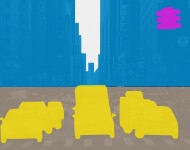
This goes into the specifics of every image. It involves adding info about an object, i.e, color, location, appearance, etc., to help machines differentiate. For instance, the vehicle in the center would be a yellow taxi in lane 2.
Object Tracking
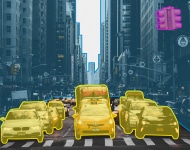
This involves identifying an object’s details, such as location and other attributes across several frames in the same dataset. Footage from videos and surveillance cameras can be tracked for object movements and studying patterns.
Now, let’s address each method in a detailed manner.
Image Classification
Image classification assigns one or more labels to an image (or a cropped region). It’s the fastest and lowest-cost annotation type and is a good fit when location isn’t required.
Use it when you need: Defect vs non-defect, disease present/absent, scene type, content category.
Quality focus: Clear class definitions, balanced coverage across classes, and confusion-matrix review.
Object Detection
Object detection identifies what objects are present and where they are—usually using bounding boxes (axis-aligned, rotated, or cuboids for 3D).
Key scoping choices:
- Box style: Axis-aligned vs rotated vs 3D cuboid
- Granularity: “Vehicle” vs “car/bus/truck.”
- Attributes: Occluded, truncated, damaged, pose, etc.
Quality focus: Consistent box tightness rules, overlap handling, and IoU-based acceptance criteria.
Image Segmentation
Segmentation labels pixels, enabling the model to understand shapes and boundaries.
- Semantic segmentation: Every pixel is assigned a class (e.g., road, sky, building)
- Instance segmentation: Separates individual objects of the same class (each car gets its own mask)
- Panoptic segmentation: Combines semantic + instance segmentation in one output
In modern workflows, segmentation is often accelerated using model-assisted masks and then refined by humans for boundary accuracy and edge cases. Promptable segmentation approaches (e.g., SAM-style pipelines) can speed up mask creation but still require QA for long-tail and domain-shift scenarios.
Quality focus: Overlap metrics (IoU/Dice) plus boundary checks where edges matter.
Object Tracking
Object tracking follows objects across frames in a video, assigning persistent track IDs (e.g., Person-12) over time. Tracking enables motion understanding, behavior analysis, and multi-camera analytics.
Key scoping choices:
- Frame strategy: Annotate every frame vs keyframes + interpolation
- Occlusion rules: When to keep an ID vs start a new ID
- Re-identification: How to handle exits and re-entries
- Track attributes: Direction, speed bands, interactions, violations, etc.
Quality focus: ID consistency, occlusion handling, and clear rules for “lost” vs “re-found.”
Image Annotation Techniques
Image annotation is done through various techniques and processes. To get started with image annotation, one needs a software application that offers the specific features and functionalities, and tools required to annotate images based on project requirements.
For the uninitiated, there are several commercially available image annotation tools that let you modify them for your specific use case. There are also tools that are open source. However, if your requirements are niche and you feel the modules offered by commercial tools are too basic, you could get a custom image annotation tool developed for your project. This is, obviously, more expensive and time-consuming.
Regardless of the tool you build or subscribe to, there are certain image annotation techniques that are universal. Let’s look at what they are.
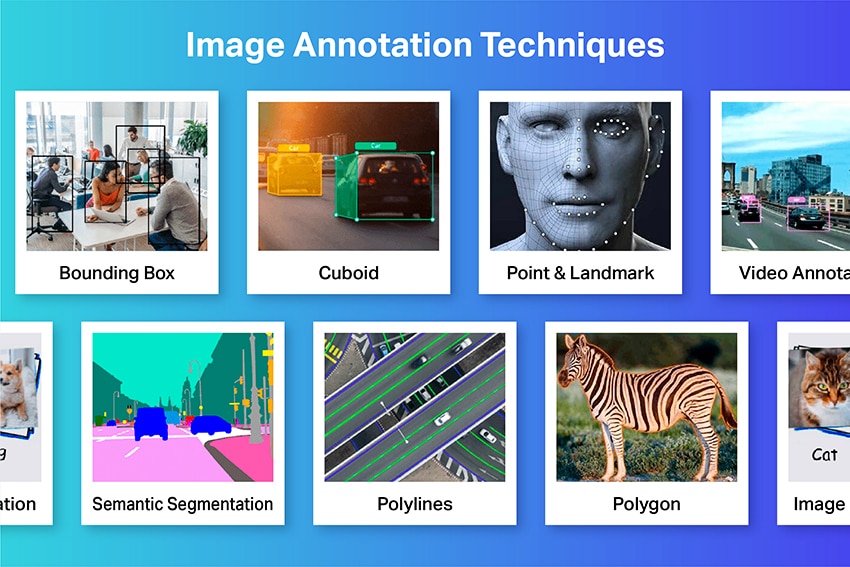
Bounding Boxes (Axis-Aligned, Rotated, and 3D Cuboids)
Bounding boxes are rectangles drawn around an object to show where it is. They’re the most common technique because they’re fast, scalable, and work well for detection models.
When to use bounding boxes
- You need object location, but not exact shape.
- Objects have clear boundaries and don’t require pixel precision.
- You want a cost-effective dataset for detection or counting.
Common use cases
- Retail shelf product detection
- Vehicle and pedestrian detection
- Equipment detection in industrial sites
- Damage detection (dent/scratch) when the approximate location is enough
Landmarking/Keypoints
Landmarking (keypoint annotation) marks specific points on an object—like corners, joints, or anatomical markers. It helps models understand pose, alignment, shape, and measurement.
When to use keypoints
- You need pose estimation (body/hand/face)
- You need precise alignment (corners/edges of objects)
- You’re measuring distances/angles (medical or industrial)
Common use cases
- Driver Monitoring: Eye corners, mouth points, head pose
- Healthcare Imaging: Anatomical landmarks for measurement
- Sports Analytics: Joint positions for motion analysis
- Manufacturing: Key corners/holes for part alignment and quality checks
Polygons/Masks (Pixel-Accurate Labels)
Polygons trace the outline of an object. They’re often converted into segmentation masks, which label the object at the pixel level. This is ideal when shape and boundaries matter.
When to use polygons/masks
- You need precise boundaries (not just a box)
- Objects are irregular (defects, organs, spills, foliage, damage)
- Small shape differences impact performance (fine-grained segmentation)
Common use cases
- Medical segmentation (organs, lesions)
- Industrial defects (cracks, corrosion, scratches)
- Background removal/product cutouts
- Agriculture (crop/weed regions), geospatial (buildings, water bodies)
Polylines (Lines)
Polylines are connected points used to label paths, edges, and thin structures that aren’t well represented by boxes or polygons. They’re ideal for things like lanes, borders, cracks, wires, or vessels.
When to use polylines
- The object is long and thin (a line-like structure)
- You care about direction, continuity, or curvature
- You’re mapping routes, boundaries, or networks
Common use cases
- Road lanes, curbs, and boundaries (ADAS/mapping)
- Cracks on surfaces (infrastructure inspection)
- Pipes/cables/wires in industrial imagery
- Blood vessels in medical imaging
- Rivers/roads in satellite imagery
Use Cases for Image Annotation
In this section, I will walk you through some of the most impactful and promising use cases of image annotation, ranging from security, safety, and healthcare to advanced use cases such as autonomous vehicles.
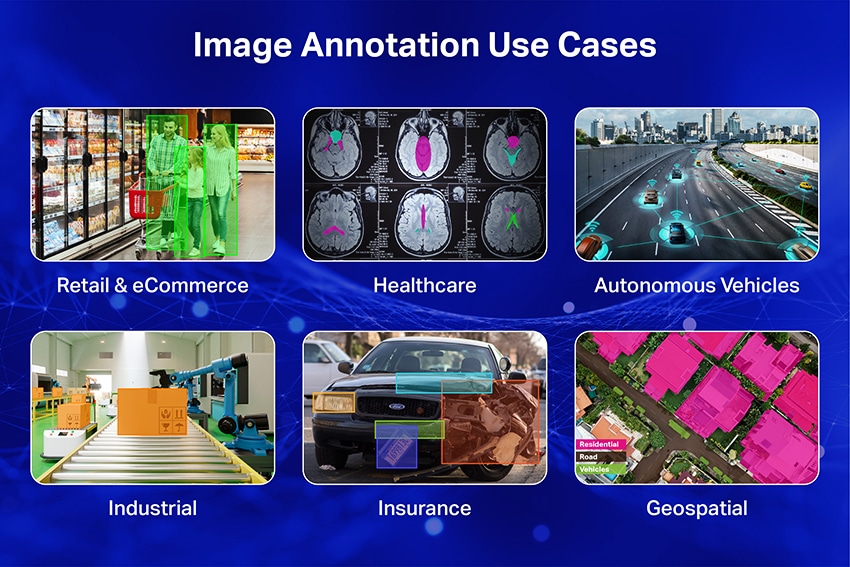
Retail & eCommerce Search (Product discovery, shelf analytics)
Goal: Help users find products visually (search, recommendations) and help retailers understand shelf conditions (availability, planogram compliance).
Best-fit annotation: Classification + Object Detection (sometimes Instance Segmentation for fine detail).
What you label:
- Product categories/brands/SKUs (taxonomy matters
- Bounding boxes for products on shelves (and optionally price tags)
- Attributes like “front-facing,” “occluded,” “damaged,” “out-of-stock gap”
Healthcare Imaging (Detection support, measurement, triage)
Goal: Support clinical workflows such as identifying regions of interest, measuring structures, or flagging cases for review (not replacing clinicians).
Best-fit annotation: Segmentation + Keypoints/Landmarks (sometimes classification).
What you label:
- Pixel-accurate masks for organs/lesions/structures
- Landmarks for measurements (e.g., key anatomical points)
- Attributes like “uncertain,” “artifact present,” “poor image quality”
Autonomous / Robotics (Scene understanding and safety)
Goal: Understand the environment to navigate safely—detect objects, interpret drivable space, and predict motion.
Best-fit annotation: Object Detection + Segmentation + Tracking (often multi-frame/video).
What you label:
- Vehicles/pedestrians/cyclists/signals/obstacles (boxes + attributes)
- Drivable area/lanes/sidewalks (masks + polylines)
- Tracking IDs over time (object persists across frames)
Industrial Inspection & Manufacturing (Defect detection and localization)
Goal: Detect and localize defects early to reduce scrap, rework, and warranty claims.
Best-fit annotation: Detection for coarse localization; Segmentation for irregular defects.
What you label:
- Defect regions (scratches, cracks, corrosion, dents, contamination)
- Defect type + severity attributes
- “Acceptable variation” vs true defect (very important in QA)
Insurance / Claims (Damage assessment support)
Goal: Speed up claims processing by identifying damaged areas and estimating severity, while assisting human adjusters.
Best-fit annotation: Detection + Segmentation (plus classification for severity).
What you label:
- Damaged components (bumper, door, windshield, roof)
- Damage regions (scratch/dent/crack) with masks or boxes
- Attributes: severity, part type, “multiple damages,” lighting/angle issues
Geospatial & Mapping (Feature extraction from aerial/satellite imagery)
Goal: Extract features for mapping, planning, agriculture, disaster response, and infrastructure monitoring.
Best-fit annotation: Polygons/Masks + Polylines (sometimes detection).
What you label:
- Building footprints, water bodies, land cover (polygons/masks)
- Roads, rivers, pipelines, boundaries (polylines)
- Attributes: road type, surface type, building type, “under construction”
In-House, Outsourced, or Hybrid? Choosing the Right Annotation Strategy for Your ML Project
Image annotation demands investments not just in terms of money but time and effort as well. As we mentioned, it is labor-intensive and requires meticulous planning and diligent involvement. What image annotators attribute is what the machines will process and deliver results. So, the image annotation phase is extremely crucial.
Now, from a business perspective, you have two ways to go about annotating your images –
- You can do it in-house
- Or you can outsource the process
- Hybrid
These are unique and offer their own fair share of pros and cons. Let’s look at them objectively.
[Also Read: What is AI Image Recognition? How It Works & Examples]
| Decision Factor | In-House | Outsourced | Hybrid (Common in 2026) |
|---|---|---|---|
| Speed to start | Slower (hiring + tooling) | Faster (ready workforce) | Fast (vendor workforce + internal lead) |
| Scale | Limited by hiring | Scales quickly | Scales with control |
| Domain expertise | Strong with specialists | Varies by vendor | Internal SMEs + vendor execution |
| QA governance | High if well-resourced | Depends on vendor maturity | Internal QA owner + vendor QC |
| Security & privacy | Easier to control | Controls must be verified | Sensitive data internal; bulk labeling external |
| Cost predictability | Mixed (fixed overhead) | Often per-unit | Balanced |
How to Choose the Right Image Annotation Vendor or Platform (Evaluation Checklist 2026)
When teams say they’re looking for “outsourcing,” they’re often choosing two things:
- An image annotation platform (the tool/workflow layer), and/or
- An image annotation vendor (the service team that executes labeling at scale).
Some companies buy a platform and run labeling in-house. Others hire a vendor who uses their own platform. Many choose a hybrid: you own the platform and guidelines; the vendor supplies trained annotators and QA operations.
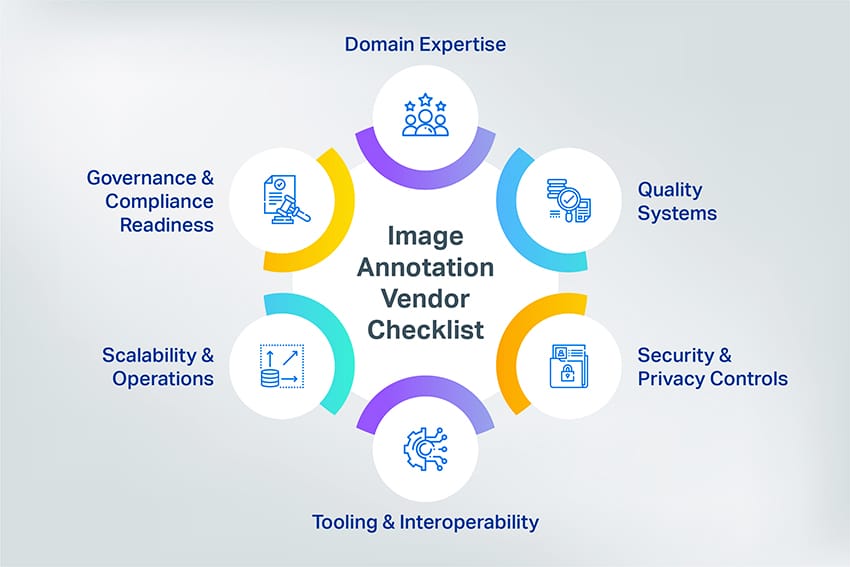
Image Annotation Platform Checklist
1. Workflow fit (does it support your task?)
- Does the platform support your required label types (boxes, rotated boxes, polygons/masks, keypoints, polylines, video tracking)?
- Does it support reviewer workflows (single-pass, double-pass, escalation)?
2. QA features (built-in quality controls)
- Consensus labeling or review queues
- Audit sampling + issue tagging
- Ability to maintain a golden set and run calibration checks
3. Interoperability (avoid lock-in)
- Export formats you need (and schema ownership—you own the taxonomy/labels)
- Dataset/version control and change logs
- API support for task routing, automation, and pipeline integration
4. Security & access control
- Role-based access + audit logs
- Data retention controls and secure transfer options
- Support for restricted environments (VDI/VPN) for sensitive datasets
Image Annotation Vendor Checklist (Service partner you depend on)
1. Domain Fit & Evidence
- Can you share sample guidelines, a golden set, and QA reports from similar projects?
- What’s your reviewer ratio and escalation workflow for ambiguous cases?
- How do you train annotators and keep them calibrated over time?
2. Quality System (Non-Negotiable)
- What QA methods do you use (consensus, double-pass review, audits)?
- How do you measure and report quality (task-specific metrics + error taxonomy)?
- What are your acceptance criteria for each label type (boxes, masks, keypoints, tracking)?
3. Security & Privacy Controls
- Role-based access controls and audit logs
- Secure data transfer and storage, retention policy
- Options for VDI/VPN or restricted environments for sensitive datasets
4. Tooling & Interoperability (Vendor + Platform Compatibility)
- Can the vendor work in your image annotation platform (or export cleanly to it)?
- Versioning of labels and guidelines (change control)
- Clear handoff: Schemas, exports, and QA summaries per delivery batch
5. Scalability & Operations
- Throughput commitments and SLA
- Ability to ramp teams without quality drop
- How they handle new classes, new geographies, and guideline changes
6. Governance & Compliance Readiness (Planning for 2026 & Beyond)
If you operate in regulated environments, ask how vendors and platforms support auditability, documentation, and data governance.
Quick Tips
- Choose a strong image annotation platform if you need control, integrations, and internal QA ownership.
- Choose an image annotation vendor if you need fast scale, trained workforce, and stable throughput.
- Choose hybrid if you want both: keep taxonomy + QA ownership internal, and use a vendor for execution at scale.
Wrapping Up
Why teams work with Shaip
Shaip helps organizations build high-quality training data for computer vision by combining clear annotation guidelines, measurable QA, and secure delivery workflows. Whether you need bounding boxes, polygons/masks, keypoints, polylines, or video annotation, our teams can support your project with scalable operations and consistent quality standards.
What you can expect:
- Support for complex, domain-specific labeling with documented guidelines and examples.
- QA processes designed around your task (audit sampling, reviewer workflows, acceptance criteria).
- Secure handling of sensitive data with controlled access and traceability.
- Versioned deliverables and clear reporting so your ML team can iterate faster.
If you’d like, we can review your use case and recommend the most cost-effective labeling approach and QA plan.
Let’s Talk
Frequently Asked Questions (FAQ)
Image annotation is a subset of data labeling that is also known by the name image tagging, transcribing, or labeling that involves humans at the backend, tirelessly tagging images with metadata information and attributes that will help machines identify objects better.
An image annotation/labeling tool is a software that can be used to label images with metadata information and attributes that will help machines identify objects better.
Image labeling/annotation services are services offered by 3rd party vendors who label or annotate an image on your behalf. They offer the required expertise, quality agility, and scalability as and when required.
A labeled/annotated image is one that has been labeled with metadata describing the image making it comprehensible by machine learning algorithms.
Image annotation for machine learning or deep learning is the process of adding labels or descriptions or classifying an image to show the data points you want your model to recognize. In short, it’s adding relevant metadata to make it recognizable by machines.
Image annotation involves using one or more of these techniques: bounding boxes (2-d,3-d), landmarking, polygons, polylines, etc.