
Have you ever wondered how chatbots and virtual assistants wake up when you say, ‘Hey Siri’ or ‘Alexa’? It is because of the text utterance collection or triggers words embedded in the software that activates the system as soon as it hears the programmed wake word.
However, the overall process of creating sounds and utterance data isn’t that simple. It is a process that must be carried out with the right technique to get the desired results. Therefore, this blog will share the route to creating good utterances/trigger words that work seamlessly with your conversational AI.
What is an “Utterance” in AI?
In conversational AI (chatbots, voice assistants), an utterance is a short piece of user input—the exact words a person says or types. Models use utterances to figure out the user’s intent (goal) and any entities (details like dates, product names, amounts).
Simple examples
E-commerce bot
Utterance: “Track my order 123-456.”
- Intent: TrackOrder
- Entity: order_id = 123-456
Telecom bot
Utterance: “Upgrade my data plan.”
- Intent: ChangePlan
- Entity: plan_type = data
Banking voice assistant
Utterance (spoken): “What’s my checking balance today?”
- Intent: CheckBalance
- Entities: account_type = checking, date = today
Why Your Conversational AI Needs Good Utterance Data
If you want your chatbot or voice assistant to feel helpful—not brittle—start with better utterance data. Utterances are the raw phrases people say or type to get things done (“book me a room for tomorrow,” “change my plan,” “what’s the status?”). They power intent classification, entity extraction, and ultimately the customer experience. When utterances are diverse, representative, and well-labeled, your models learn the right boundaries between intents and handle messy, real-world input with poise.
Building your utterance repository: a simple workflow
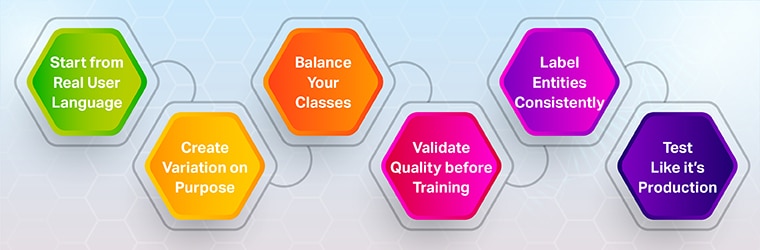
1. Start from real user language
Mine chat logs, search queries, IVR transcripts, agent notes, and customer emails. Cluster them by user goal to seed intents. (You’ll capture colloquialisms and mental models you won’t think of in a room.)
2. Create variation on purpose
For each intent, author diverse examples:
- Rephrase verbs and nouns (“cancel,” “stop,” “end”; “plan,” “subscription”).
- Mix sentence lengths and structures (question, directive, fragment).
- Include typos, abbreviations, emojis (for chat), code-switching where relevant.
- Add negative cases that look similar but should not map to this intent.
3. Balance your classes
Extremely lopsided training (e.g., 500 examples for one intent and 10 for others) harms prediction quality. Keep intent sizes relatively even and grow them together as traffic teaches you.
4. Validate quality before training
Block low-signal data with validators during authoring/collection:
- Language detection: ensure examples are in-target language.
- Gibberish detector: catch nonsensical strings.
- Duplicate/near-duplicate checks: keep variety high.
- Regex/spelling & grammar: enforce style rules where needed.
Smart validators (as used by Appen) can automate large parts of this gatekeeping.
5. Label entities consistently
Define slot types (dates, products, addresses) and show annotators how to mark boundaries. Patterns like Pattern any in LUIS can disambiguate long, variable spans (e.g., document names) that confuse models.
6. Test like it’s production
Push unseen real utterances to a prediction endpoint or staging bot, review misclassifications, and promote ambiguous examples into training. Make this a loop: collect → train → review → expand.
What “messy reality” really means (and how to handle it)
Real users rarely speak in perfect sentences. Expect:
- Fragments: “refund shipping fee”
- Compound goals: “cancel order and reorder in blue”
- Implicit entities: “ship to my office” (you must know which office)
- Ambiguity: “change my plan” (which plan? effective when?)
Practical fixes
- Provide clarifying prompts only when needed; avoid over-asking.
- Capture context carryover (pronouns like “that order,” “the last one”).
- Use fallback intents with targeted recovery: “I can help cancel or change plans—what would you like?”
- Monitor intent health (confusion, collision) and add data where it’s weak

Voice assistants and wake words: different data, similar rules

When (and how) to use off-the-shelf vs. custom data

- Off-the-shelf: jump-start coverage in new locales, then measure where confusion remains.
- Custom: capture your domain language (policy terms, product names) and “brand voice.”
- Blended: start broad, then add high-precision data for the intents with the most deflection or revenue impact.
If you need a fast on-ramp, Shaip provides utterance collection and off-the-shelf speech/chat datasets across many languages; see the case study for a multilingual assistant rollout.
Implementation checklist

- Define intents and entities with examples and negative cases
- Author varied, balanced utterances for each intent (start small, grow weekly)
- Add validators (language, gibberish, duplicates, regex) before training
- Set up review loops from real traffic; promote ambiguous items to training
- Track intent health and collisions; fix with new utterances
- Re-evaluate by channel/locale to catch drift early
How Shaip can help
- Custom utterance collection & labeling (chat + voice) with validators to keep quality high.
- Ready-to-use datasets across 150+ languages/variants for rapid bootstrapping.
- Ongoing review programs that turn live traffic into high-signal training data—safely (PII controls).
Explore our multilingual utterance collection case study.